
AutoTimetable - school timetabling

Easy & Efficient

  • Easy & Efficient
  • Generate Timetables in Minutes
  • Inbuilt Teacher Substitution
  • Full Control at all Stages
  • Exports in EXCEL and PDF
  • Suggestions for Load Balancing
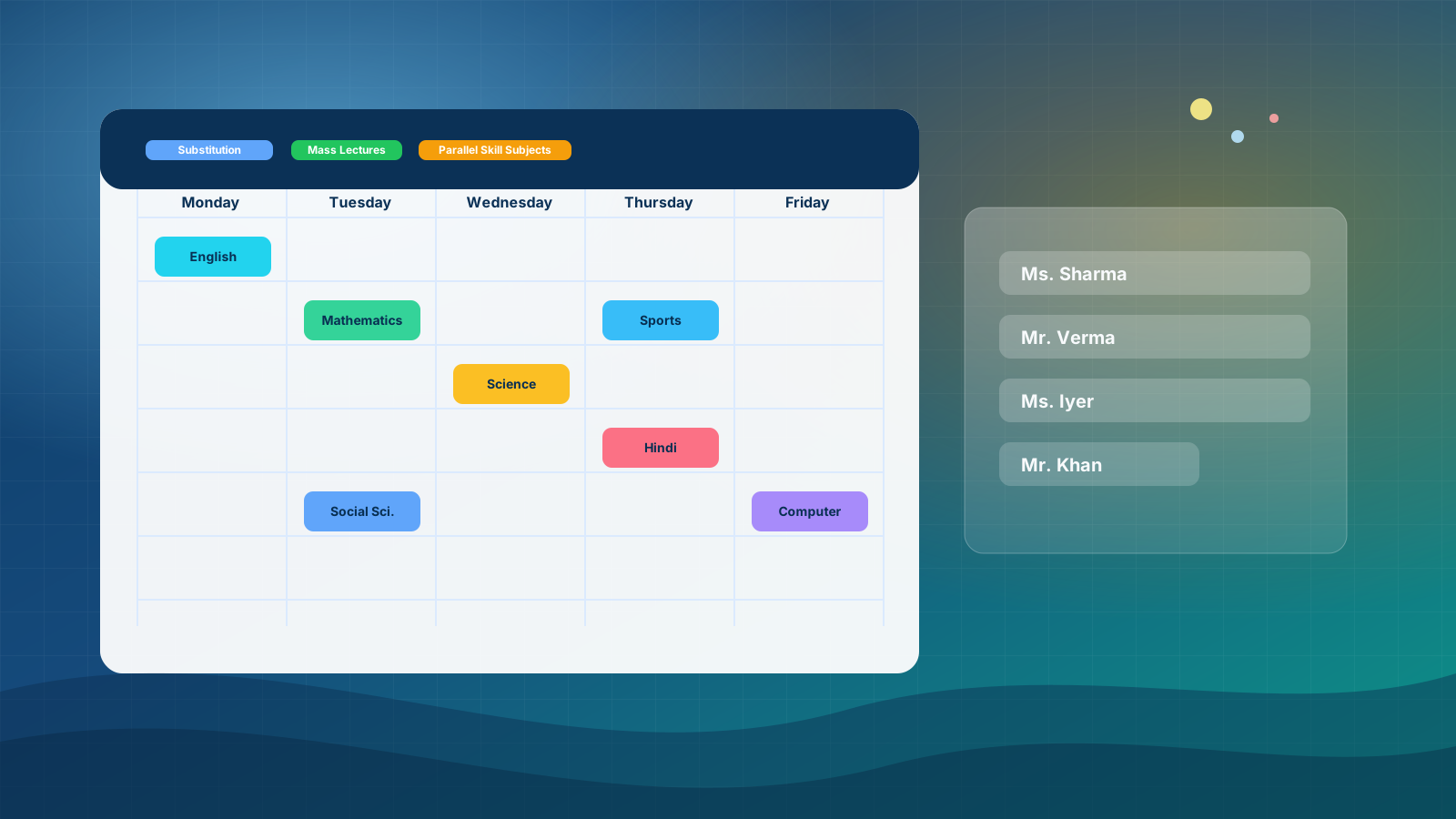
  • Provision for Mass Lectures
  • Provision for Parallel Skills/Electives
A2Z‑MySchoolApp · AutoTimetable
Avail limited period, discounted Introductory offer by contacting us today ·

Easy and efficient school timetabling — web‑based, LDAP‑ready.

Design conflict‑free timetables and exam schedules in minutes. AutoTimetable understands teachers, rooms, subjects and constraints, then generates an optimized plan for your entire school.

What’s different: a directory‑native data model, a long‑running web worker you can pause or resume, hybrid solvers (heuristics + CP‑SAT repair), and a single JSON pipeline from admin → teacher portal → optional cloud—plus manual grid editing after generation, teacher‑wise workload statistics, inbuilt substitution, and exams in the same stack.

Mass lectures Parallel skills Pause · Resume · Stop Multi‑solver Substitution Teacher portal Cloud sync Multi backup & restore Manual edit Teacher stats
Multi‑campus ready Supports complex class & staff structures
LDAP native Secure directory‑backed data model
Novel stack Hybrid solvers · one JSON · portal + cloud
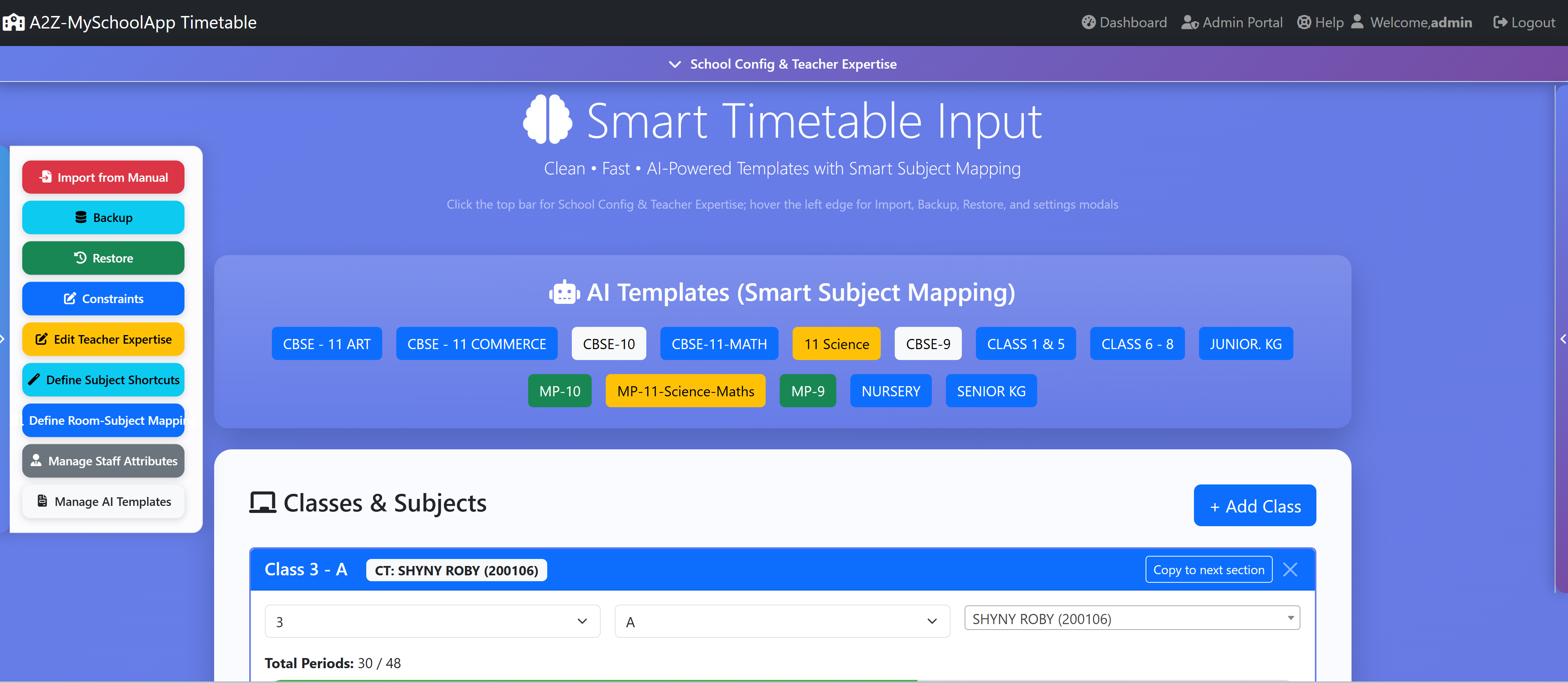
Live Timetable AI Templates Innovative
Substitution → Portal & cloud
Class Mon Tue Wed Thu Fri
X‑A Maths
T001
Science
T014
English
T009
Hindi
T021
Games
T040
XI‑Sci Physics (Lab)
Lab‑1
Chemistry
Lab‑2
Maths
T031
CS
Lab‑3
PE
Ground
Class / Teacher / Room views Excel & PDF exports Clash checks Firebase sync Drag / cell edit Per‑teacher analytics

Trust cannot be scheduled, but schedules created by AutoTimetable can be Trusted & Used in Real Schools.

- by A2Z‑MySchoolApp Team

A schedule defends from chaos and whim. It is a net for catching days.

— Annie Dillard, The Writing Life

Different by design

Innovative & novel — the complete AutoTimetable webapp

Most schools juggle a desktop timetabler, a separate cover system, and ad‑hoc files. AutoTimetable is built as one web application where LDAP, optimization, substitution, exams, backups, and optional cloud sync share the same architecture—here’s what that unlocks.

Rare in K‑12 timetabling

LDAP as the live system of record

Timetable input, constraints, and published timetableGenerated JSON live in your directory, not a hidden local file. That means SSO‑aligned access, IT‑auditable attributes, and backups that fit your existing identity governance—unusual for timetable products, which are usually siloed.
Operator-grade web UX

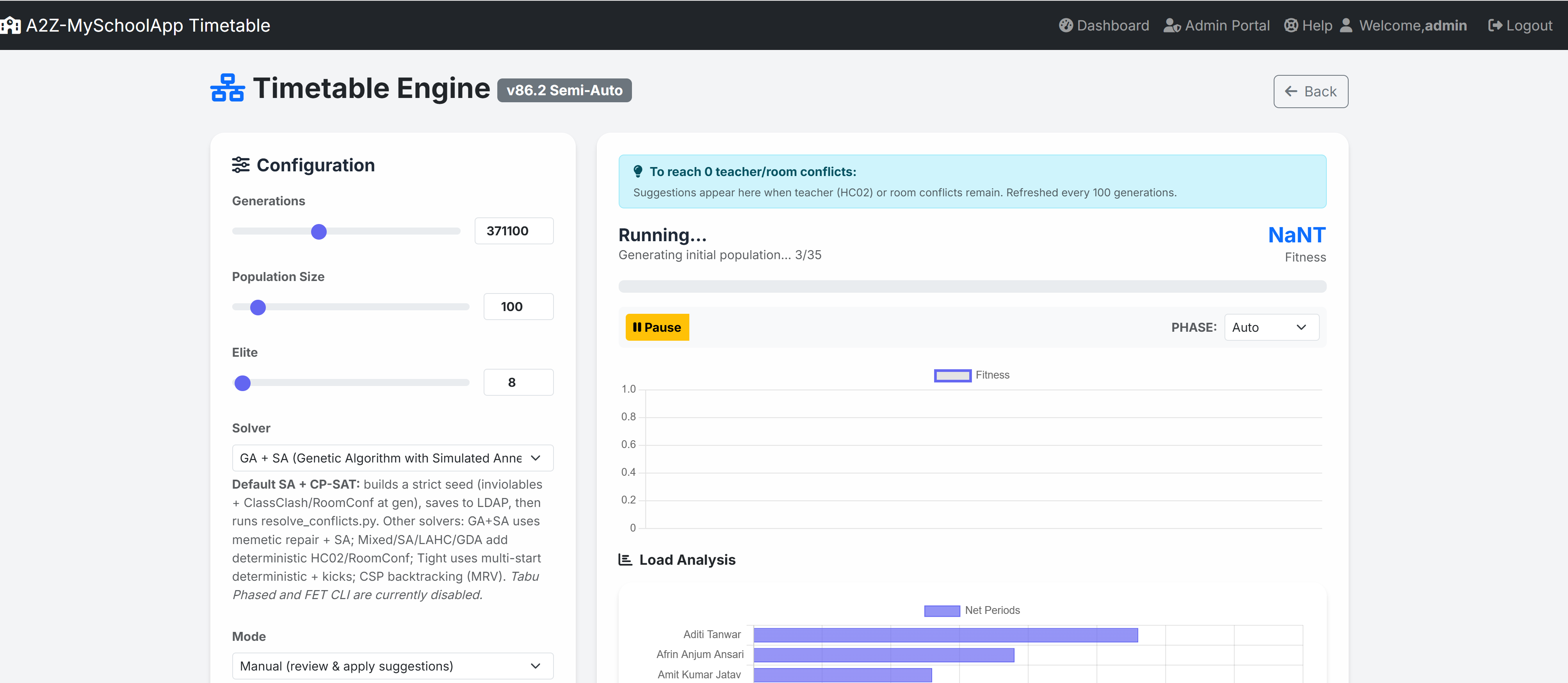
Background GA with pause · resume · stop

Long optimizations run in a PHP background worker with checkpoints—not a single blocking desktop session. Admins can pause, resume, or stop safely, then continue from saved state: a novel control model for school timetabling in the browser.

Hybrid, not one-trick

Many solvers + CP‑SAT conflict repair

Switch engines (SA, GA, Tabu, CSP, LAHC, GDA, phased strategies, and more) in one UI, with a default SA + CP‑SAT pipeline that tightens feasibility. Combining memetic / annealing search with OR‑Tools style resolution in one school product is a standout differentiator.

Single source of truth

One JSON → admin, portal, optional Firebase

Substitutions merge into the same timetableGenerated document with structured metadata (e.g. portal overlays by day). Optional Firebase push reuses that JSON—no parallel spreadsheet truth for “what teachers see today.”

First-class structures

Mass lectures & parallel skill streams

Combined periods across sections and synchronized optional / skill bands (e.g. skill streams) are modeled as scheduling primitives—not afterthoughts—so real Indian board layouts map cleanly to the engine.

Full lifecycle in one app

Substitution · exams · multi-backup together

Inbuilt substitution, exam clash scheduling, multiple backup & restore slots, exports, and AI template shortcuts sit in the same webapp—reducing vendor sprawl and integration risk.

Wording reflects product architecture as documented in the user manual; enabled modules and solver lists may vary by deployment.

Built for real schools.

AutoTimetable sits directly on top of your LDAP directory and understands the way your school actually runs: classes, sections, staff, rooms and constraints.

Why this stack is novel — directory-native data, hybrid solvers, and one JSON for admin, portal & cloud.

LDAP‑native · On‑prem ready

AI templates & shortcuts Smart

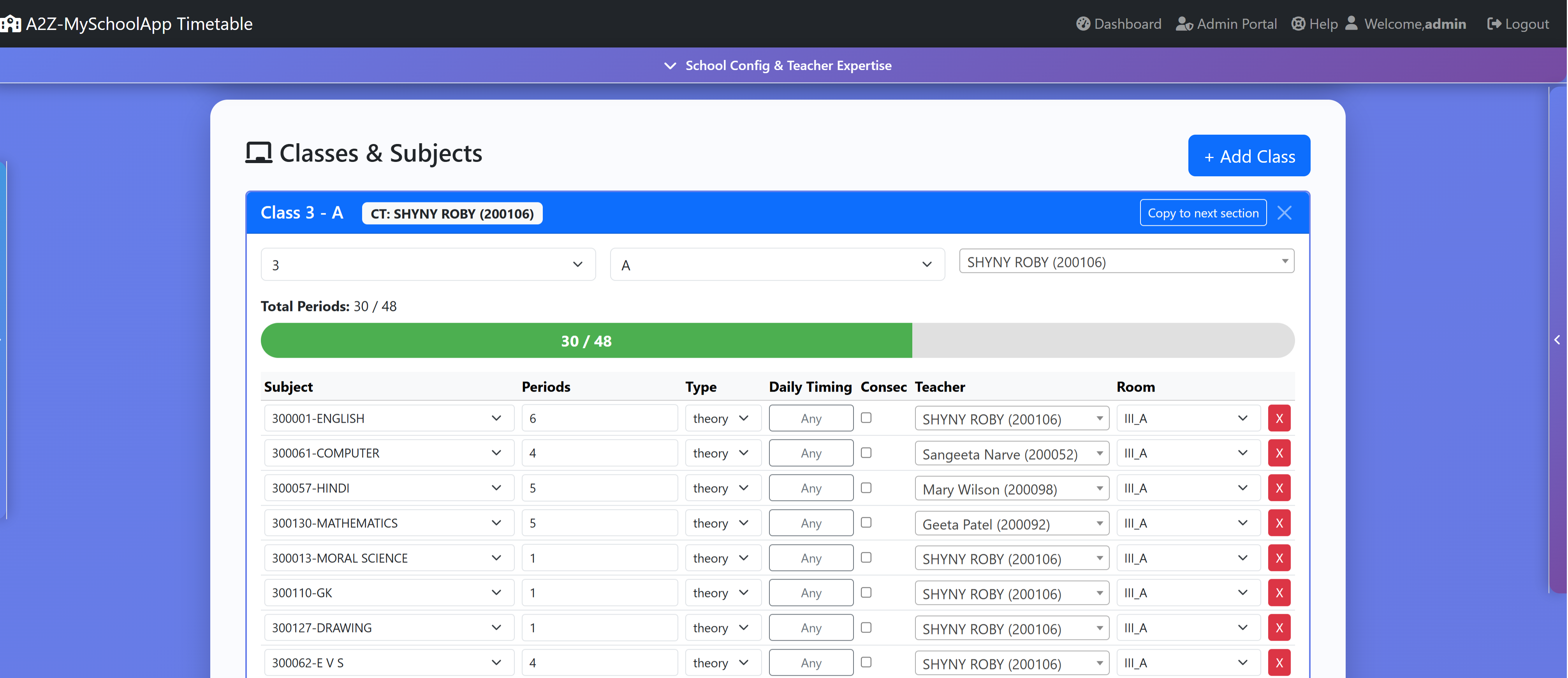
Start from curated templates (CBSE, MP Board, custom boards) and map them to your real subjects using shortcuts. The system finds the closest matching subject name automatically when you apply a template.

  • Per‑class AI templates
  • Smart subject name mapping
  • Room preferences by subject

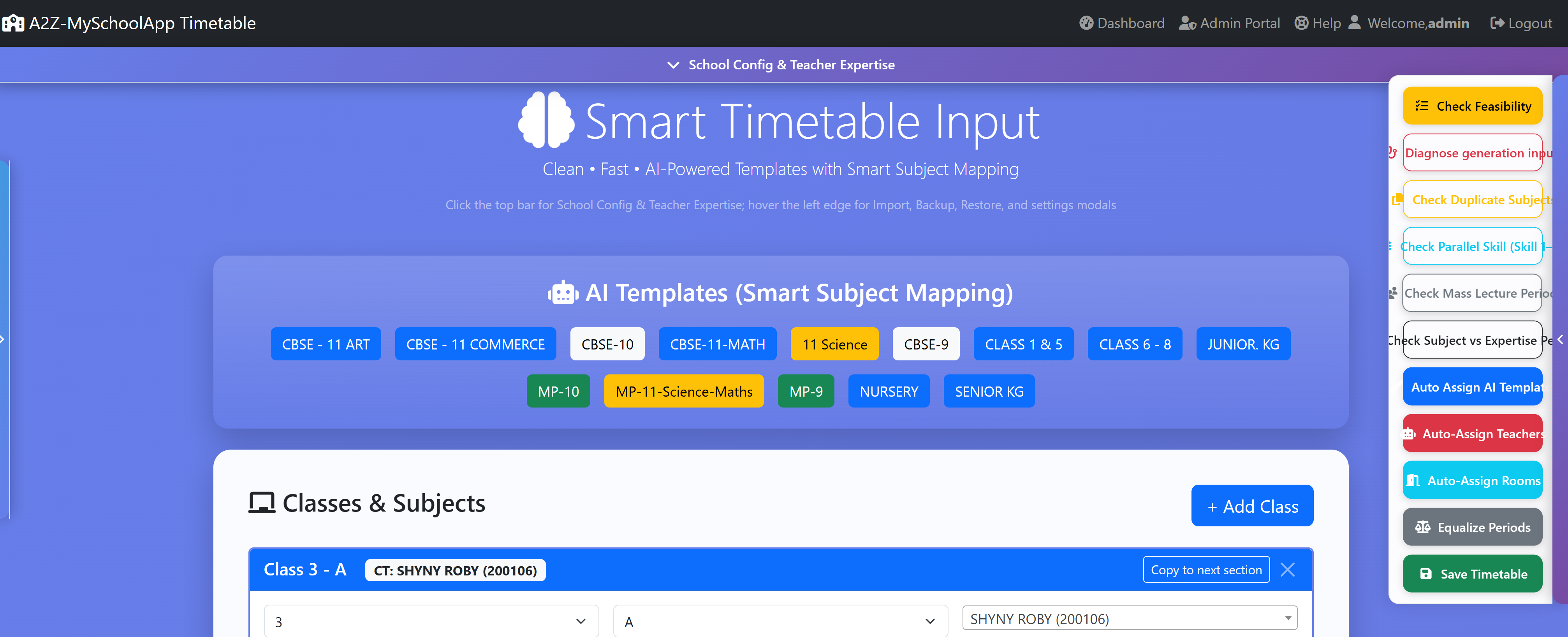
Teacher‑first engine

Honour teacher expertise, preferred loads and free periods. Automatic substitution suggestions ensure classes keep running even when staff are absent.

  • Workload‑aware auto‑assign
  • Teacher‑wise statistical view — periods taught, gaps, consecutive blocks, lab vs theory mix (GA / analytics screens)
  • Dynamic substitution manager
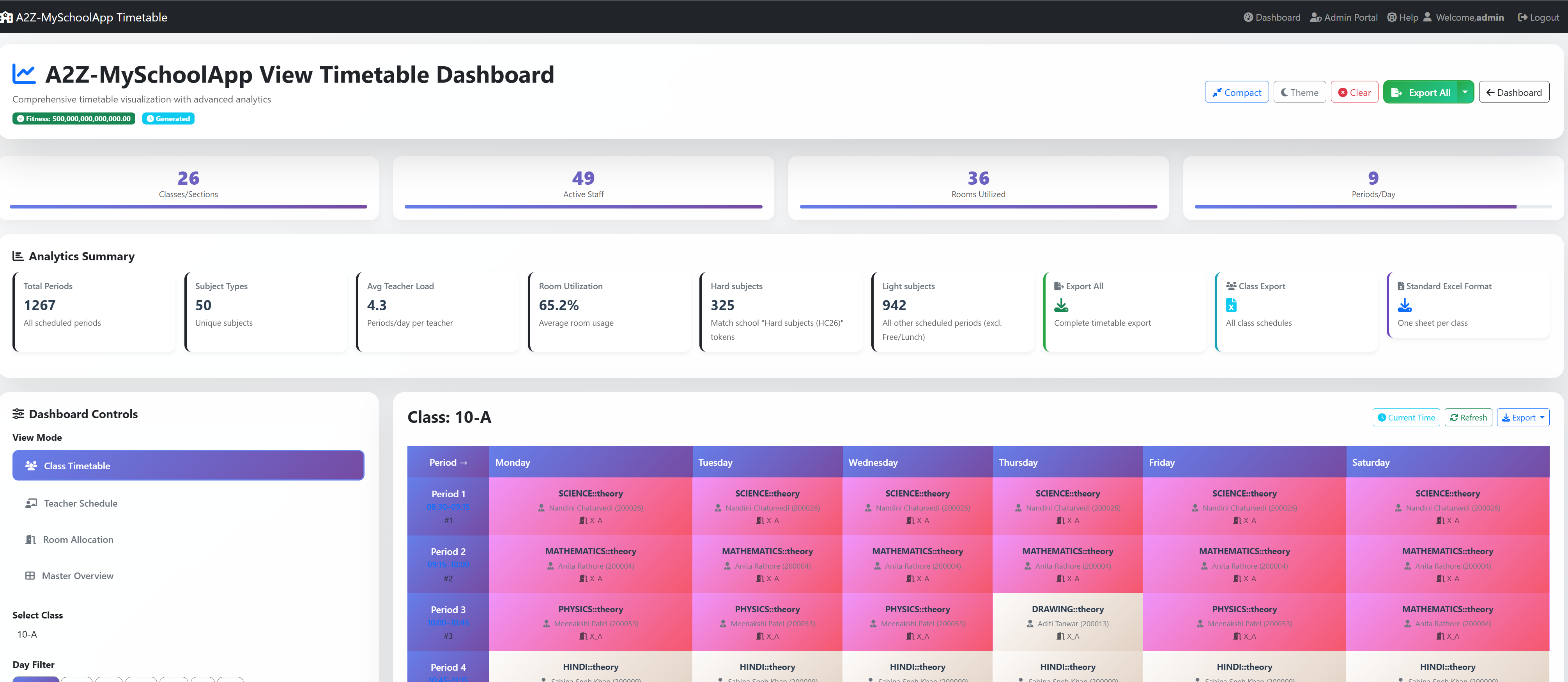
  • Multiple views & room / class analytics

Room & lab utilization

Define which rooms are best suited for which subjects and let the engine propose allocations that respect lab capacities, special rooms and constraints.

  • Subject → room mappings
  • Clash‑free room scheduling
  • Room wise timetable view

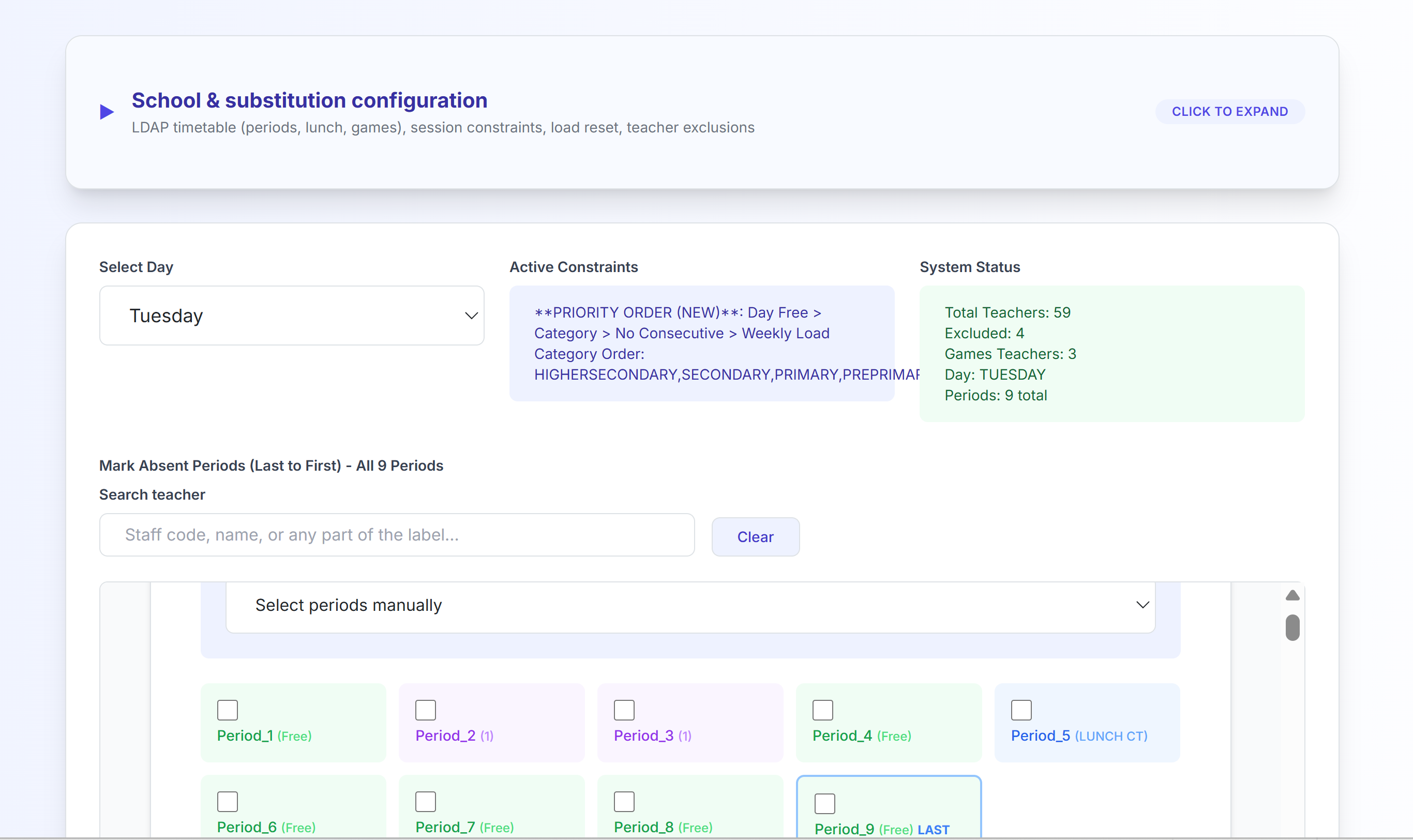
Inbuilt teacher substitution

No separate spreadsheet workflow: mark absences by day and period, run smart substitution with priorities (free periods, load, class category, games teachers, CT lunch rules), and see successful vs failed placements with reasons.

  • LDAP‑backed exclusion lists & school day config
  • Updated grid written to timetableGenerated for the portal
  • Optional push of the same JSON to the cloud (see below)

Teacher portal

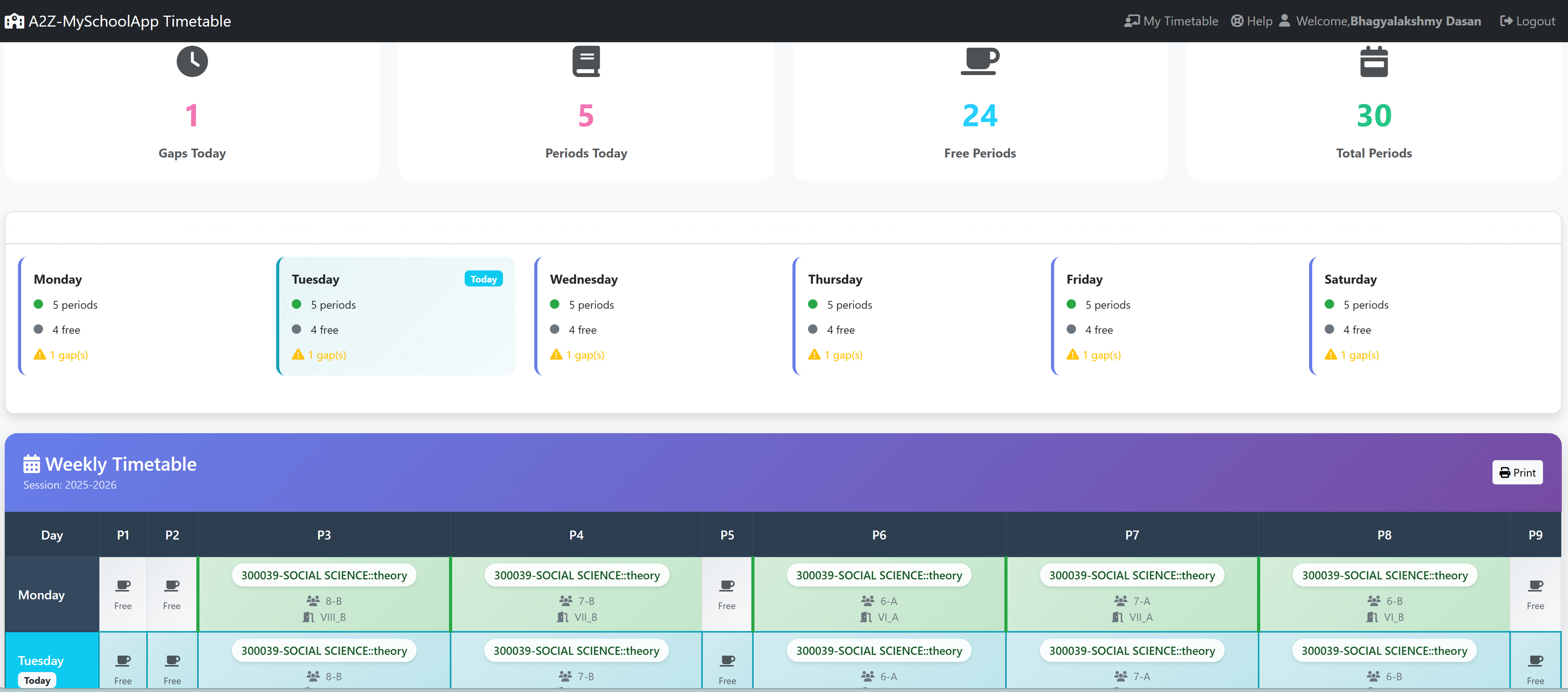
Each teacher sees their weekly timetable from LDAP. When admins save substitutions, overlay metadata highlights who is covering, uncovered absences, and class‑teacher duty notes—so staff always see today’s truth.

  • Personal schedule; substitution patches by day
  • Aligned with published timetableGenerated JSON
  • Mobile‑friendly access alongside your SSO/LDAP login

Timetable & substitution in the cloud

Connect Firebase Realtime Database via LDAP‑stored app credentials. Each time the master timetable (with substitution overlays) is saved, the latest timetableGenerated document can be written to /timetables for mobile apps, dashboards, or parent portals.

  • Configurable from admin substitution / Firebase settings
  • Service account + DB URL + secret (deployment‑dependent)
  • Same JSON teachers see—one source of truth in LDAP, mirrored in the cloud

Multiple backup & restore

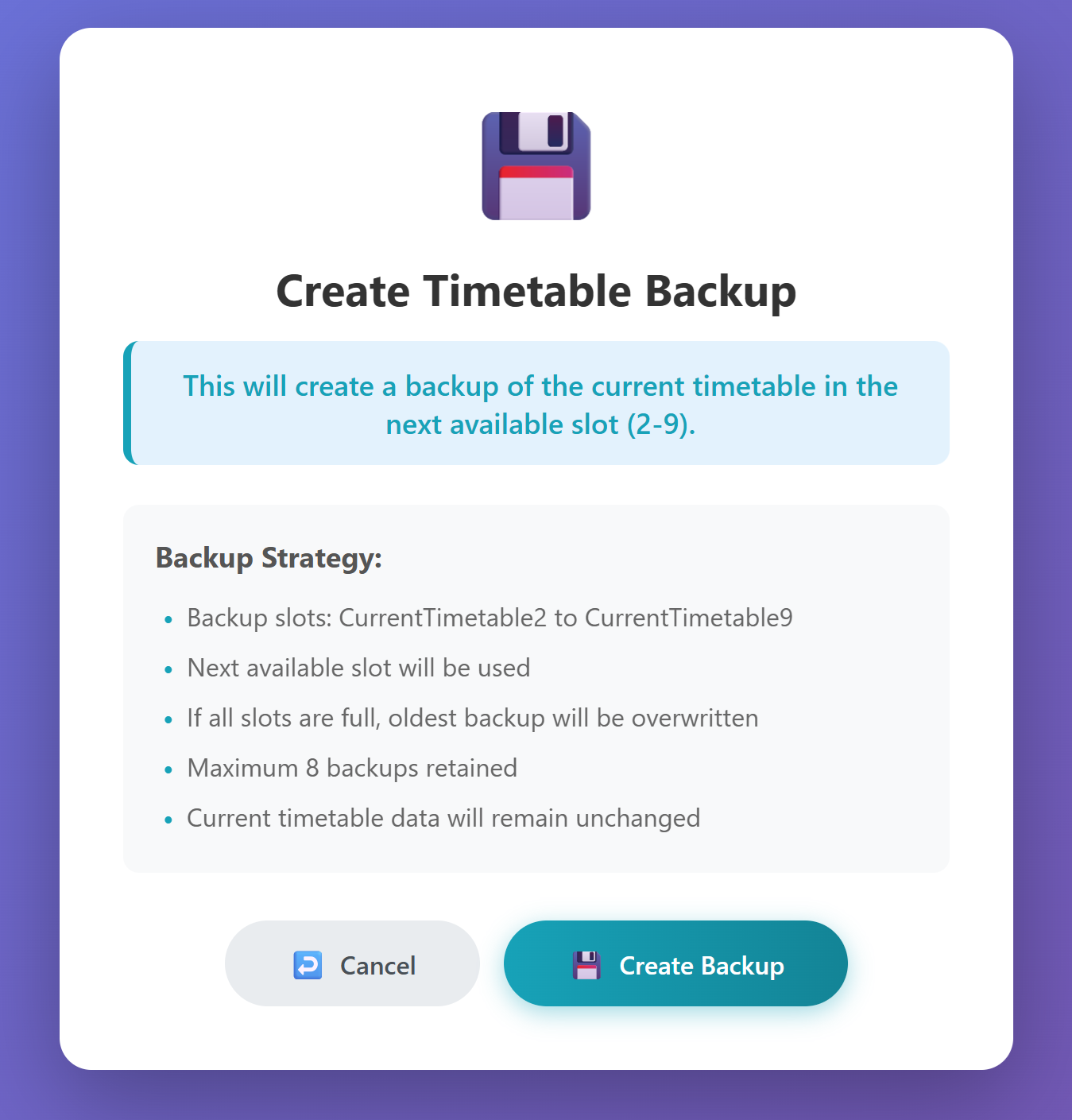
Create several independent restore points before major edits, term rollovers, or experiments. Roll back timetableGenerated, constraints, input grids, or GA session snapshots without losing other work.

  • Named slots (e.g. “pre‑subs”, “after skills”, “term draft”)
  • Restore to LDAP, local snapshot, or downloadable archive
  • Complements pause/resume — safe recovery if optimisation diverges

Mass lectures

Schedule the same subject across multiple sections of one grade in a shared slot: one teacher, one room pattern, aligned periods—exactly how assembly halls, shared academics, and combined batches run in real schools.

  • Defined from timetable input as mass‑lecture rows linked to participating sections
  • Engine builds atomic groups so all sections move together per period index
  • Works with room capacity, teacher availability, and the rest of your hard/soft rules

Parallel skill subjects

Model optional streams and skill bands (e.g. skill1–skill19) so every participating section gets the same period index for that stream—labs, vocational blocks, and split groups stay in lockstep.

  • Per (grade, skill type) atomic groups across sections
  • Multiple subjects in one section under the same skill type can stack in the shared slot
  • First‑class support alongside mass lectures and standard theory/lab rows

Selectable constraints

Rules aren’t “all or nothing”: tune which constraints apply, how strongly they bite (hard vs soft / weights), and review a summary before each GA run so you know what the optimiser will enforce.

  • Constraint sets stored in LDAP with the rest of timetable configuration
  • Toggle or weight rules to experiment—then save when you’re happy
  • Works with conflict reports, charts, and pause / resume workflows

Manual timetable editing

The optimiser doesn’t have the last word: edit the live grid in the browser—swap teachers, rooms, or subjects cell‑by‑cell (or via your deployment’s manual mode tools), then validate clashes before you save to LDAP.

  • Refine auto‑generated results without restarting a full GA run
  • Works alongside conflict reduction suggestions and re‑optimisation when you choose
  • Pairs with backup & restore before large hand edits

Teacher‑wise statistical view

See fairness and load at a glance: per‑teacher period counts, free periods, consecutive teaching stretches, and subject mix—ideal for HOD review before you publish or when you negotiate last‑minute tweaks.

  • Charts and summaries on the GA / optimisation workflow (as implemented in your build)
  • Complements period‑wise, teacher‑wise, and room‑wise view timetable grids
  • Helps justify manual swaps and constraint weight changes with data
Teachers & operations

Substitution, portal, and cloud—connected end‑to‑end

From the admin substitution screen to every teacher’s phone: one pipeline. LDAP remains the system of record; the teacher portal and optional Firebase mirror keep daily operations visible without exporting CSVs.

Smart substitution engine

Built into the product—no bolt‑on. Configure periods, lunch, games staff, and “never substitute” lists in LDAP. Generate substitutions for a chosen weekday; review period‑wise, teacher‑wise, and room‑wise updated grids. Results merge into timetableGenerated under structured metadata for downstream consumers.

Portal: timetable + substitution context

Teachers open the portal to see their standard weekly pattern plus substitution overlays: which periods are covered by a colleague, which remain absent, and notes for class‑teacher duties. Updates appear after admins save from the substitution workflow—no duplicate data entry.

Cloud mirror (Firebase)

When enabled, the same JSON published for the portal can be PUT to Firebase Realtime Database at /timetables on every save—ideal for App Check–aware clients or a companion app that listens for live updates. Credentials are read from your LDAP app‑details entry; your IT team controls keys and rules.

Cloud sync is optional. Treat Firebase secrets and service accounts like any other production credential.

Operational safety: multiple backups

Admins can maintain parallel backup slots (LDAP snapshots, server-side files, or exports) and restore selectively—ideal before bulk substitution days, exam week freeze, or trying an alternate solver path. Pair with pause / resume so you always have a known-good baseline to return to.

Scheduling engine

Built for real-world timetabling—not just a grid filler

Model combined periods across sections, synchronized optional streams, long-running optimization with full operator control, and choose from many algorithms—from CP‑SAT hybrid defaults to Tabu, GA, CSP, and more. Use multiple backup & restore points whenever you change constraints mid-run or compare solver outcomes.

Mass lectures

Same subject, type, teacher & room across multiple sections of one grade are locked into the same period—ideal for shared lectures, labs, or assembly-style blocks. The engine groups rows automatically from your timetable input.

Parallel skill subjects

skill1skill19 bands keep all sections of a grade aligned in time for that stream, while each section can run different subjects, teachers, and rooms in the same slot—perfect for optional / split groups.

Pause · Resume · Stop

Long optimizations run in the background. Pause at safe checkpoints, resume without losing progress, or stop cleanly before changing parameters or LDAP data—so admins stay in control during peak season.

All solvers

Pick the algorithm that fits your problem: default SA + CP‑SAT, GA + SA, Tabu, CSP, LAHC, GDA, hybrid / mixed / tight, quantum-inspired, optional FET CLI, and phased strategies.

SA + CP‑SAT default Tight Tabu Tabu phased GA + SA SA + det CSP Hybrid Mixed LAHC GDA Deterministic QA-inspired FET CLI

The live app’s solver dropdown may hide or disable individual options per deployment; the manual lists each engine and typical use.

Step-by-step: input rules, constraints, optimization, substitution, exams, and troubleshooting.

Read the full user manual

Plans & pricing (India · INR)

Market orientation (2025–26, India)

  • Budget timetable‑only SaaS in India is often advertised from about ₹500–₹3,000 per year for very small schools (basic web generators, limited support).
  • Established desktop / perpetual timetabling suites sold through Indian channels are commonly quoted from roughly ₹11,000–₹55,000 one‑time across tiers (vendor‑ and edition‑dependent).
  • Full school ERP / compliance stacks frequently use ₹15–₹100+ per student per year or ₹20,000–₹2,50,000+ per year institute bands, with on‑premise deployments at the higher end once servers, AMC, and modules are included.
  • AutoTimetable is positioned between lightweight timetable SaaS and full ERP: LDAP‑native web app, advanced solvers, substitution, exams, and optional cloud sync—hence the mid‑tier one‑time, annual cloud, and on‑premise licence bands below.

One‑time timetable generation

Project‑based: we generate and hand over one academic year—ideal if you only need a fresh master timetable.

₹34,999 + GST · per engagement

Typical campus: up to ~1,200 students · 1 campus

  • Full constraint‑aware generation for one academic year (class–section grid, teachers, rooms, rules as deployed).
  • LDAP‑backed configuration and data model during the agreed project window.
  • Mass lectures, parallel skill bands, lunch/games rules, and multi‑solver runs (engines enabled in your build).
  • Standard exports / print views as shipped in your deployment (e.g. PDF or LDAP‑stored views).
  • Two refinement cycles on constraints / weights after first feasible draft.
  • Multiple backup & restore slots for deliverable handover (named snapshots + export pack).
  • Email support for the engagement (typically 8 weeks from kick‑off).
  • No ongoing SaaS hosting; no Firebase / teacher‑portal subscription included.

On‑premises timetable generation

Software and data stay on your servers—maximum control for IT policies and compliance.

₹3,49,999 + GST · one‑time licence

Includes 1 year premium support · AMC from ₹44,999/yr

  • Perpetual licence for AutoTimetable on infrastructure you operate (VM / server OS as supported).
  • All core modules: LDAP integration, GA / solvers, substitution, exams, admin UI.
  • No mandatory public cloud for timetable data; optional hybrid sync only if you enable it.
  • Installation & go‑live: remote architecture review, deploy assistance, and handover (duration per SOW).
  • Administrator training (typically 2 live sessions) included in year one.
  • 12 months premium support & patch eligibility from licence date.
  • Multiple backup & restore on your servers — unlimited local slots per your storage policy.
  • AMC renewals from ₹44,999 + GST / year (updates, support channel, critical fixes—final in contract).

Prices are illustrative for planning; campus size, LDAP complexity, training days, and statutory taxes may change the final proposal. For quotes and intro offers, contact sales@idas.co.in or +91 8319635193 (Sales/Info/Support Team). Third‑party trademarks and competitor pricing mentioned in the survey are for context only and may change without notice.

Exam calendars without conflicts.

Extend the same data‑driven engine to exams. Plan exam slots per subject, per class, with automatic checks for clashes across rooms and invigilators.

  • Exam names and subjects pulled directly from LDAP
  • Clash detection for class, room and invigilator
  • Quick “add all subjects for this exam” helpers
  • Backup & restore exam schedule state before locking dates for the whole school
Open Exam Scheduler
Exam Schedule Clash alerts
Date Class Subject Room Invigilator
10 Mar X‑A Mathematics Room 12 T021
12 Mar X‑A Science Lab‑2 T017

The exam scheduler understands the live timetable and prevents double booking of rooms or invigilators across overlapping slots.

How AutoTimetable fits into your day.

AutoTimetable is designed to be operated by school admins and senior staff. No scripting, no spreadsheets—just structured data, intelligent defaults and clear dashboards. See what makes the architecture novel before you dive into the steps below.

  1. Sign in using your LDAP credentials from the secure login screen.
  2. Configure staff, subjects, rooms and class structures in the admin portal.
  3. Use AI templates and shortcuts to seed subject loads per class.
  4. Run the timetable generator and review teacher‑wise statistical views alongside per‑room analytics.
  5. Manually edit the timetable grid where needed, resolve clashes, then save to LDAP.
  6. Use pause / resume / stop to control long optimization runs safely.
  7. Define mass lectures and parallel skill rows where your timetable needs synchronized slots.
  8. Run inbuilt teacher substitution; teachers see updates in the portal; optionally mirror timetable + subs to Firebase for cloud apps.
  9. Use multiple backup & restore before risky edits—keep parallel snapshots and roll back without redoing LDAP entry from scratch.
  10. Use the live exam planner for clash‑free exam calendars.

Open the complete manual for detailed procedures

Admin dashboard Role‑based access
  • Admin & teacher portals with separate experiences.
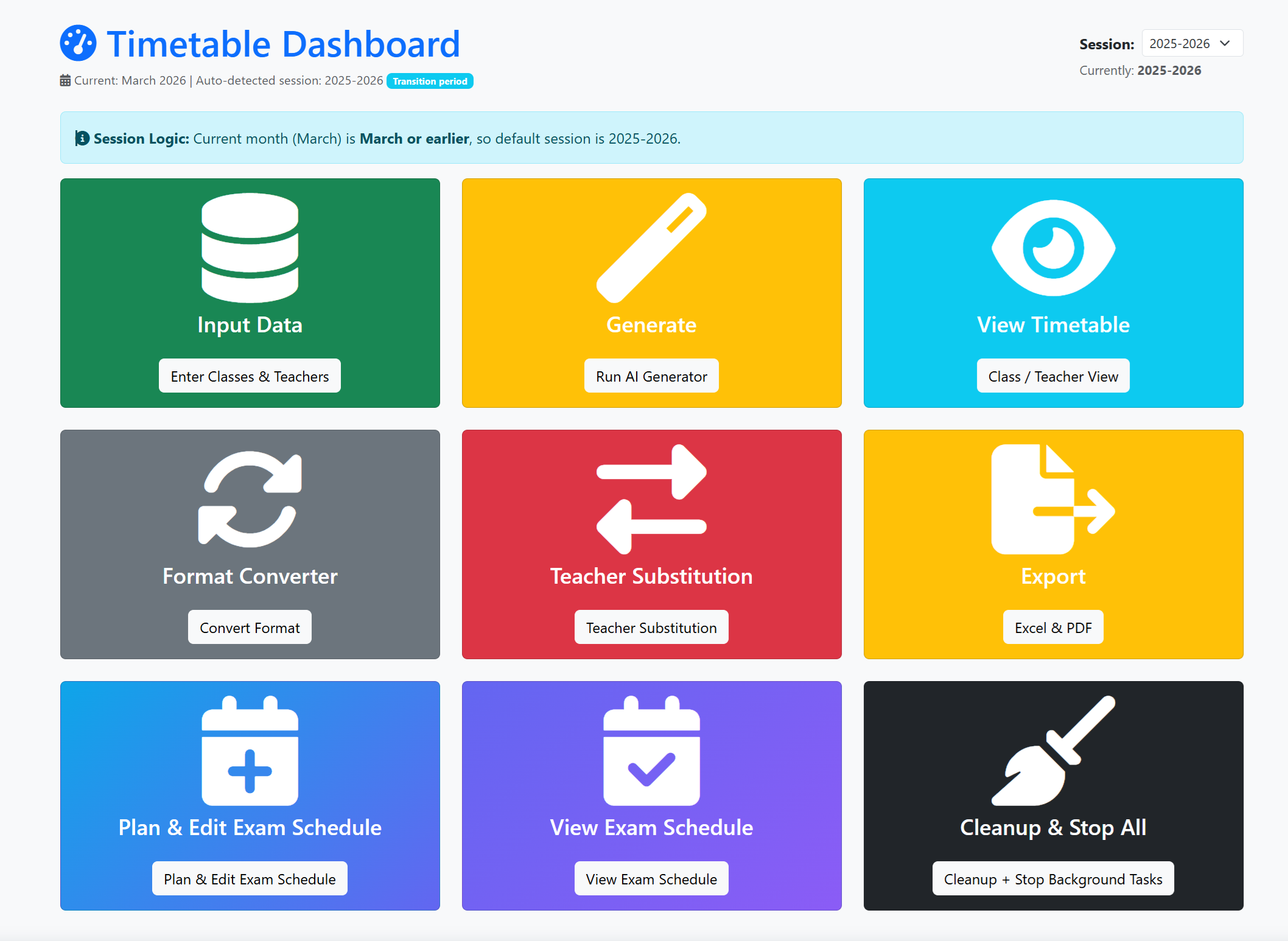
  • Dashboard shortcuts to input data, generate and view timetables.
  • Manual editing of cells in view / manual modes; teacher‑wise stats during GA review.
  • Backup & restore — several named restore points (timetable, constraints, session snapshots).
  • Export to Excel & PDF for circulation and display.
  • Format converter for integrating with other tools.

Timetabling problem blogs

Fresh notes on common pain points in older school timetabling software and practical ways to avoid them.

Problem: rigid fixed slots

When fixed-slot engines break after one staff change

Older timetable tools often lock classes to static slot templates. One transfer, one maternity leave, or one room change can force a full rebuild because dependencies are hidden. Modern rule-based timetabling should re-balance only affected clusters and preserve stable parts of the week.

Problem: late conflict discovery

Why conflict detection fails in spreadsheet-style schedulers

Many older systems show clashes only after final generation, so admins spend hours trial-and-error editing. Better systems surface violations while entering constraints: teacher overloads, room collisions, and subject sequencing issues should appear before long solver runs start.

Problem: substitution blind spots

The hidden cost of manual substitution registers

Legacy portals usually treat substitutions as separate paperwork, disconnected from the timetable grid. This creates uncovered periods and stale teacher views. A modern substitution layer should patch the active timetable directly and keep teacher-facing schedules synchronized in real time.

Problem: exam plan re-entry

Why exam scheduling collapses in older timetable products

In older products, exam scheduling is often a disconnected module requiring re-entry of rooms, invigilators, and sessions. That duplication introduces inconsistency and missed clashes. Unified scheduling should reuse the same core data model across regular timetable and exam operations.

Problem: weak rollback

No snapshot, no safety: rollback risks in old timetabling stacks

Older software frequently supports only one “latest” save, so one wrong bulk update can erase validated work. Reliable operations require multiple named snapshots, quick restore points, and exportable archives that let schools test changes without fear of irreversible loss.

Problem: unfair teacher load

Why older timetables create unfair split days and burnout

A recurring issue in legacy scheduling tools is weak load-balancing logic: some teachers get back-to-back heavy days while others get fragmented split days with idle gaps. Fair scheduling must optimize weekly totals and daily spread together, especially for part-time and specialist teachers with narrow availability windows.

Help & Support